
Do you sign up to hear from small business owners via email? I always do. Some are my friends, who have their own businesses. Others are local Mom and Pop outfits from around where I live. Still others are internet marketers, digital product sellers, and coaches whom I know from the web.
So, since most of these guys are DIYing their marketing, there’s always a chance for mistakes to occur. One that I see far too often happens with the email newsletter send. I have done it many times myself, even now, knowing better, due to being too hasty with my own communication.
Can you guess what the mistake is that nearly EVERYONE makes with their email newsletter?
Email Newsletter Mishaps Due to Image Sizing
- Here’s the Mistake
- Don’t Force the Scroll
- Example of What I Mean
- Quick HTML Fix
- How I Do It
- Tips to Avoid Email Errors
- Outsource Email Marketing
The Mistake: Images are Improperly Sized, Forcing the Reader to Scroll Left and Right
This is the email marketing mistake that I see from nearly EVERYONE…. even “the pros”… even ME, if I hurry through my email creation and don’t do a test-send first.
It’s that the sender forgets to reduce the width of their images before hitting send on the email.
Below, find a screen shot of an email I received from a local gal who runs a cooking and crafting blog. Keep in mind, I love to hear from her! She makes great content.
But let me just sit in the place of the email recipient right now.
At the moment, I’m seeing through the eyes of the receiver because I AM the receiver.
So you and I, all of us who email updates to a list, must remember that our recipients, no matter how much they love and support us, are NOT going to have the same level of interest or patience as WE DO in our own marketing.
You (we) only have ONE change to hit the inbox for a perfect, smooth landing.
If the email ends up causing difficulty for the recipient, they’re just going to close out or click away. It happens that fast.
What Does an Email With Too-Big Images Look Like to the Recipient?
Here’s what an email looks like when the images aren’t properly sized:
Improperly Sized Email Images – Mobile View Screen Shot 1
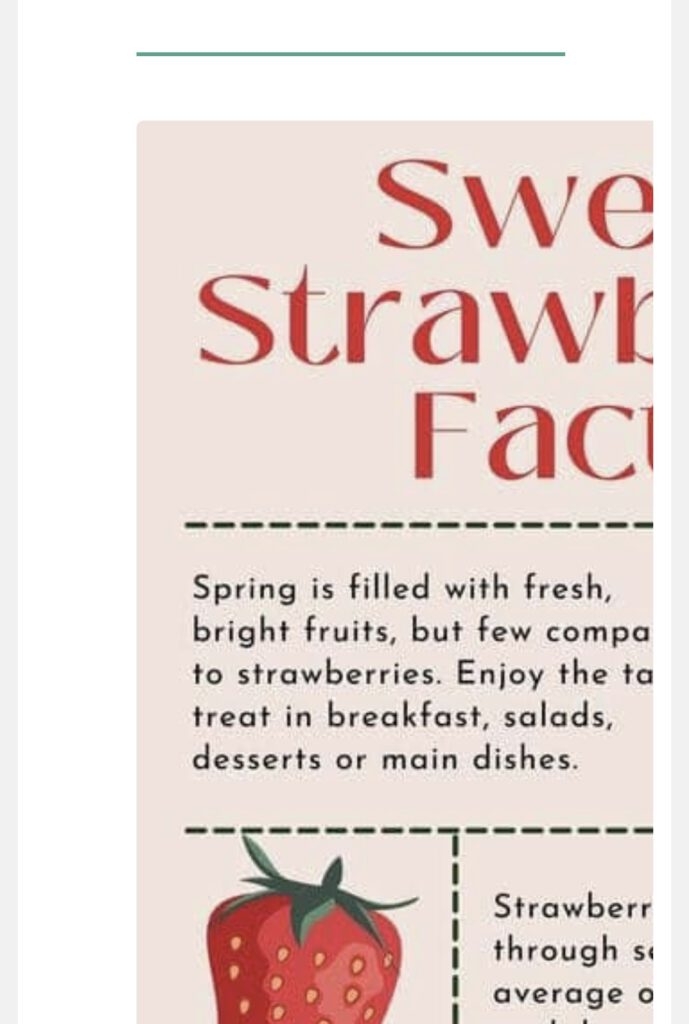
Improperly Sized Email Images – Mobile View Screen Shot 2
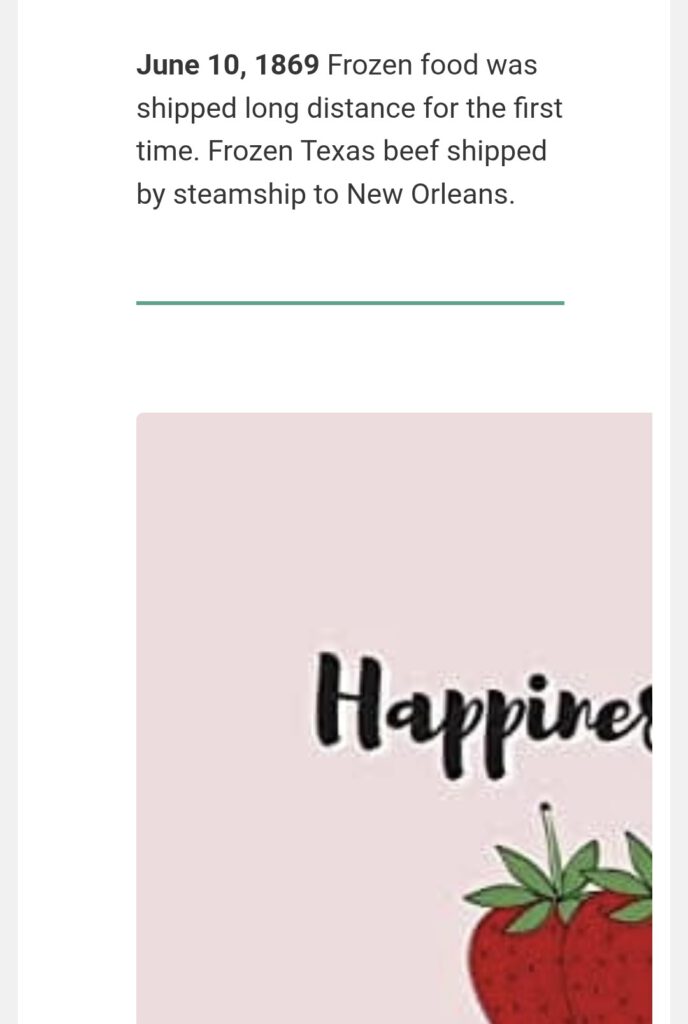
Notice that this user has properly formatted the TEXT of her emails. As a result, everything is neatly positioned in the center, in a narrow, mobile-friendly column that makes it easy to read even if opened on a smart phone.
But when we get to the images she shared… they’re way outside the frame. Some users may scroll left and right, but many won’t take the time.
Why is It Important Not to Make the Email Recipient Scroll Left and Right?
So, as you can see, this is a mobile view, and that’s the whole problem. If the email containing the larger-sized images gets opened from a desktop computer, it probably won’t be necessary to scroll left and right in order to read the message.
But, we must remember that MANY people are now opening emails on the go from their phones.
And the problems are…
- Opening emails on the go means less patience.
- Emails don’t look right from the mobile view if the images are too big for the space.
- After the email gets opened, gmail inconveniently hides it (MANY users sign up for my emails with gmail accounts – that modern-day problem is a story for another time, though).
Today’s user is extremely mentally fragmented. If you want them to actually absorb the words you wrote, click links, sign up and whatnot, you must make this EASY for them.
Having to scroll left and right breaks the focus.
Add “Oops, I opened your email as I was getting in the car about to drive somewhere, then ten emails came in after that while I was on the road…”
…and your email with the super sized images is likely never going to be read by said person, let alone appreciated for all the effort you took to write it.
Quick HTML Fix for Oversized Email Images that Need to Fit into a Template and Size for Mobile View
<img src="your-image.jpg"
alt="description"
style="width:100%; max-width:600px; height:auto; display:block; border:0;">
Here’s the effect of the above code:
- width: 100% → lets the image shrink to fit small screens
- max-width: 600px → prevents it from getting too large on desktop
- height: auto → keeps proportions correct (no stretching)
- display: block → removes annoying gaps underneath images
How I code my email image sizes (when I remember to do it – forgot the last time, oops!)
For me personally, I don’t do max width on my images. Instead, I paste in the images directly from my web page, then flip to the HTML code view, and code the images as follows, never doing more than 350px across:
<img src="your-image.jpg" alt="description" style="width:350px; height:auto; display:block; border:0;">
Another Way to Make Sure Your Emails Are Viewed Correctly
Some list management services offer an option for the reader to click a link that takes them directly to an online version of the email that can be viewed in a browser. This is one way to solve the “oops, I did it again” problem of not resizing your images before pressing SEND.
I personally use Aweber, and I know this link does show up for the recipient to click on from the email itself.
Ways to Prevent Mistakes When Sending Emails to Your List
Here’s how to stop making silly email marketing mistakes like this, that can easily be avoided:
- ALWAYS send a test email to yourself.
- SIGN UP for your own emails, from different email addresses so you can see how they present from one email client to the next.
- Have a few friends sign up to act as email testers for your broadcasts.
- Ask users how their experience has been from the receiving end.
- Don’t include images in your emails (whaaattt? how boring! true, but it’s a legit workaround so I included it)
- Hire a virtual assistant to write, format and send the emails for you.
Outsource Email Marketing to an Old Salt from the Online Business World

Okay… not THAT old, but plenty salty. 🙂
Email me for an email marketing quote today. I promise, I’ll resize the images AND do a test send, every time!